
Logging
Novadesk provides a simple, familiar logging API modelled after the browser console object. All logging functions are global with no import needed. There is also a set of app module methods that let you control logging behavior (log level, file output, and whether logging is enabled at all) from within your scripts.
Availability
All console.* methods and the print shorthand are globals available in both the Main script and the UI script. No import is needed.
The app.enableDebugging(), app.disableLogging(), app.saveLogToFile(), and app.getLogPath() methods require import { app } from "novadesk" and are intended for the Main script.
Table of Contents
Log Output Format
Every message written through the logging API follows this format:
[YYYY-MM-DD HH:MM:SS.mmm] [Novadesk] [LEVEL] message| Part | Description |
|---|---|
[YYYY-MM-DD HH:MM:SS.mmm] | Local timestamp including milliseconds |
[Novadesk] | Product name (always Novadesk) |
[LEVEL] | One of [LOG], [WARN], [ERROR], or [DEBUG] |
message | The log message with all arguments joined by spaces |
Example output:
[2026-08-08 14:23:01.042] [Novadesk] [LOG] Widget ready
[2026-08-08 14:23:01.043] [Novadesk] [WARN] Config missing, using defaults
[2026-08-08 14:23:01.044] [Novadesk] [ERROR] Failed to load config: file not found
[2026-08-08 14:23:01.045] [Novadesk] [DEBUG] tick {"frame":42,"elapsed":16.7}
Console color coding
When a console window is attached, each log level is rendered in a distinct color: Debug in white, Info/Log in cyan, Warn in yellow, and Error in bright red. This only applies to an attached console, not to debug output viewers.
Log Levels
Novadesk has four log levels, ordered from most verbose to most severe:
| Level | Label | Visible by default | Method(s) |
|---|---|---|---|
| Debug | [DEBUG] | No ( requires debugging enabled ) | console.debug() |
| Info | [LOG] | Yes | console.log(), console.info(), print() |
| Warn | [WARN] | Yes | console.warn() |
| Error | [ERROR] | Yes | console.error() |
console.info uses the [LOG] label
console.info() and console.log() are functionally identical. Both map to the Info log level and produce the [LOG] prefix in output. There is no [INFO] label.
The minimum visible level defaults to Info. Messages below the current minimum are silently dropped. Calling app.enableDebugging(true) lowers the minimum to Debug, making console.debug() output visible.
Console Methods
console.log(...args) #
console
Writes a general-purpose message to the log at the Info level. This is the most common method for everyday logging.
PARAMETERS
...args any
One or more values to log. Multiple values are joined with a single space.
javascript
console.log("Widget ready");
console.log("State:", "loaded =", true, "count =", 3);
Output
[2026-08-08 14:23:01.042] [Novadesk] [LOG] Widget ready
[2026-08-08 14:23:01.043] [Novadesk] [LOG] State: loaded = true count = 3
console.info(...args) #
console
Writes a message at the Info level. Functionally identical to console.log() - both produce the [LOG] prefix in output.
PARAMETERS
...args any
One or more values to log.
javascript
console.info("Widget loaded successfully");Output
[2026-08-08 14:23:01.042] [Novadesk] [LOG] Widget loaded successfullyconsole.warn(...args) #
console
Writes a warning message at the Warn level. Use this for non-fatal problems: conditions that are unexpected or likely to cause issues but do not stop execution.
PARAMETERS
...args any
One or more values to log.
javascript
console.warn("Config key 'refreshRate' is missing. Using default: 5000ms");Output
[2026-08-08 14:23:01.042] [Novadesk] [WARN] Config key 'refreshRate' is missing. Using default: 5000msconsole.error(...args) #
console
Writes an error message at the Error level. Use this for failures that require attention: failed network requests, missing required files, invalid data, or unexpected exceptions.
PARAMETERS
...args any
One or more values to log.
javascript
try {
  const data = JSON.parse(rawText);
} catch (err) {
  console.error("Failed to parse config:", err.message);
}
Output
[2026-08-08 14:23:01.042] [Novadesk] [ERROR] Failed to parse config: Unexpected token } in JSONconsole.debug(...args) #
console
Writes a diagnostic message at the Debug level. Debug messages are silently dropped at runtime unless debugging has been enabled, so they have zero output cost in normal use.
Requires debugging to be enabled
console.debug() output only appears when app.enableDebugging(true) has been called, or when debugging is toggled on via the Manage window settings panel. See app.enableDebugging().
PARAMETERS
...args any
One or more values to log.
javascript
import { app } from "novadesk";

app.enableDebugging(true);

console.debug("tick", "frame=42", "elapsed=16.7ms");
Output (only when debugging is enabled)
[2026-08-08 14:23:01.042] [Novadesk] [DEBUG] tick frame=42 elapsed=16.7msprint(...args) #
global
A shorthand alias for console.log(). Produces identical output at the Info / [LOG] level. Convenient for quick one-liners during development.
PARAMETERS
...args any
One or more values to log.
javascript
print("Hello from Novadesk");
// exactly the same as:
console.log("Hello from Novadesk");
Output
[2026-08-08 14:23:01.042] [Novadesk] [LOG] Hello from NovadeskControlling Logging Behavior
The app module exposes four methods for controlling logging at runtime. They are fully documented on the app module reference page. The table below is a quick summary with direct links.
| Method | Summary |
|---|---|
app.enableDebugging(enable) | Lowers the minimum log level to Debug (true) so console.debug() output becomes visible, or raises it back to Info (false). Persisted to settings.json. |
app.disableLogging(disable) | Silences all log output (console and file) when true. Overrides saveLogToFile. Persisted to settings.json. |
app.saveLogToFile(enable) | Appends all log output to logs.log in the AppData directory when true. Persisted to settings.json. |
app.getLogPath() | Returns the absolute path to logs.log, or "" if file logging is not enabled. |
disableLogging overrides everything
app.disableLogging(true) silences all output regardless of the saveLogToFile setting.
Log file behavior
Logs are appended to the file and existing entries are never cleared automatically. There is no rotation or size limit, so clear the file manually if needed.
Settings File
Logging behavior can also be configured directly in settings.json under the global settings object. These values are applied at startup before any script runs.
| Key | Type | Default | Effect |
|---|---|---|---|
enableDebugging | boolean | false | true lowers the minimum log level to Debug, making console.debug() output visible |
disableLogging | boolean | false | true silences all log output (console and file) |
saveLogToFile | boolean | false | true appends all log output to logs.log in the AppData directory |
Prefer the script API
Use app.enableDebugging(), app.disableLogging(), and app.saveLogToFile() from your scripts rather than editing settings.json directly. The API methods update the file automatically and take effect immediately.
Priority: disableLogging wins
If disableLogging is true, no output is produced regardless of the saveLogToFile setting.
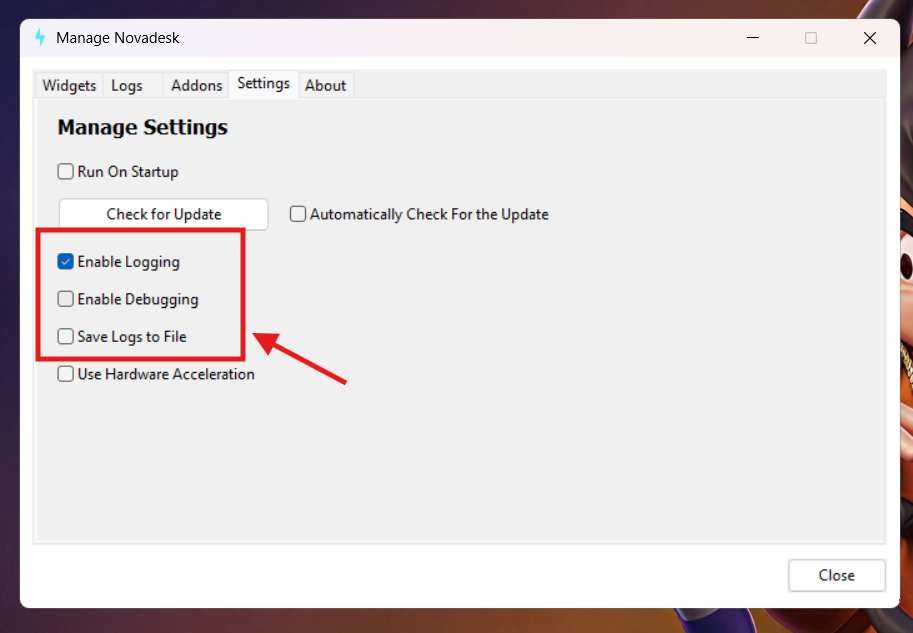
Manage Window
All three logging settings can also be toggled in the Settings tab of the Novadesk Manage window without writing any code. Changes take effect immediately.
Practical Examples
Logging at different levels
javascript
console.log("Widget starting up");
console.info("Data fetched successfully");    // identical output to console.log
console.warn("Rate limit approaching: 90%");
console.error("Fetch failed: status 503");
Debug logging during development
javascript
import { app } from "novadesk";

app.enableDebugging(true);  // see app module docs for full details

console.log("Widget starting up");
console.debug("Config loaded, theme=dark refreshRate=5000");

setTimeout(() => {
  console.debug("First update tick fired");
}, 5000);
Toggling debug output from a context menu
javascript
import { app, widgetWindow } from "novadesk";

let debugEnabled = false;

const myWindow = new widgetWindow({
  id: "Window",
  x: 10,
  y: 10,
  width: 500,
  height: 500,
  backgroundColor: "white"
})

myWindow.setContextMenu([
  {
    text: "Toggle Debug Logging",
    action: () => {
      debugEnabled = !debugEnabled;
      app.enableDebugging(debugEnabled);
      console.log("Debug logging:", debugEnabled ? "ON" : "OFF");
    }
  }
]);
Structured error logging
javascript
import * as fs from "fs";

async function loadConfig(path) {
  try {
    const raw = await fs.readFile(path, "utf8");
    const config = JSON.parse(raw);
    console.log("Config loaded from", path);
    return config;
  } catch (err) {
    console.error("Failed to load config:", err.message);
    return null;
  }
}

loadConfig("./config.json")